
If a customer searches for your business and finds two different sets of hours, one of them is wrong, and they have no way to know which. Most won’t call to find out. They’ll go to the place that shows the same answer everywhere.
This post explains what NAP is, what happens when your listings disagree, and how ITgrity finds and fixes those mismatches. It includes a real before and after from one of our clients, Elaichi Chai.grity, we built the Rank IT framework to help brick and mortar and service businesses turn their Google profile into an automated intake system that secures business while they sleep.
What NAP Means
NAP stands for Name, Address and Phone number. It is the basic identity of a local business: the details that Google, Apple Maps, Yelp and every other directory use to recognize who you are and where you are.
Business hours and your website are not part of the acronym, but they drift out of date the same way and cause the same problems. We check them together.
What a NAP Inconsistency Looks Like
A NAP inconsistency is any place where your listed details do not match your real, current details, or do not match each other. The usual culprits:
- A business name written with and without a suffix (“Acme Plumbing” and “Acme Plumbing Ltd.”)
- A suite number formatted three ways (“Ste 200”, “#200”, “Unit 200”)
- An old address or phone number left over from a move
- A wrong or mistyped postal code
- Hours updated on Google but nowhere else
- Duplicate listings for the same location
Each one looks minor on its own. The problem is that most directories do not update automatically when you change another profile, so the old version stays live until someone fixes it.
What Happens When Your Listings Disagree
Both customers and search engines lose confidence in you.
- Customers go elsewhere. Someone checks Yelp, sees you closing an hour earlier than you really do, and picks another place. You never learn the visit was lost.
- Search engines trust you less. Google compares your details across many sources. When they conflict, it has less reason to believe any single version, which weakens one of the signals behind local rankings.
- Maps, voice assistants and AI tools repeat the wrong answer. Navigation apps, assistants like Siri and Alexa, and AI tools that summarize local businesses all draw on directory data. A stale listing becomes a wrong answer, spoken confidently.
- Duplicates split your reviews and traffic. A second listing for the same location competes with your real one and spreads your reviews across two profiles.
Why Fixing It Matters
NAP errors are one of the few local SEO problems that sit entirely within your control. You cannot decide how Google ranks you. You can make sure every source it checks tells the same story.
It is also the foundation for everything else. Reviews, Google Business Profile posts and a better website all work harder when the listings underneath them are accurate. We covered why Google rewards listings that agree with each other in How Google’s Entity Algorithm Secretly Controls Local Map Rankings. Fixing NAP is the practical first step.
How ITgrity Fixes It
Fixing NAP is a core part of our Rank-IT service. Our process:
- Find where you appear. We track down every directory, map and app that lists your business, including duplicates and outdated entries you may not know exist.
- Set one source of truth. We confirm your exact name, address, phone number, hours and website with you, so the details reflect how you actually operate today.
- Correct what is wrong. We update, merge or remove listings until each one matches that source of truth exactly.
- Fill the gaps. If your business is missing from a directory that matters, we submit your details so navigation systems, home assistants and AI tools can find you. Rank-IT covers 20+ directories, including Google Maps, Apple Maps, Bing Places and Yelp.
- Keep it accurate. Weekly accuracy checks catch duplicate listings, fake listings and outdated information, so a change in hours does not sit wrong for months.
When users run specific evening queries, Google matches their intent directly against these profile service descriptions.
Real Example: Elaichi Chai
Elaichi Chai is a unique cafe at 6281 Fraser Street in Vancouver, serving Mumbai-style vada pav and chai, and an ITgrity client. When it started with us, its operating hours had recently changed. Google had the new hours. Many directory listings still showed the old ones.
Source of truth: Google
Google Maps carried the real, current hours: 9:00 AM to 9:00 PM, every day. That became the reference every other listing had to match.
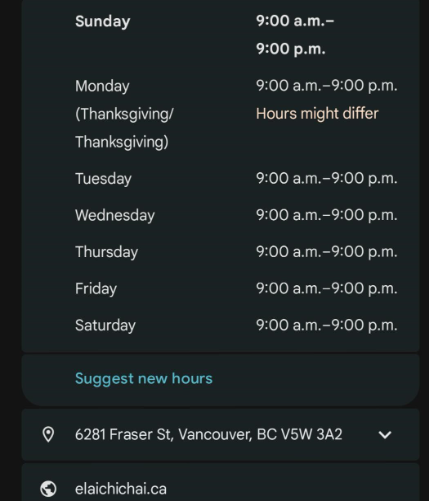
Google Maps: 9:00 AM to 9:00 PM, every day.
Before and after
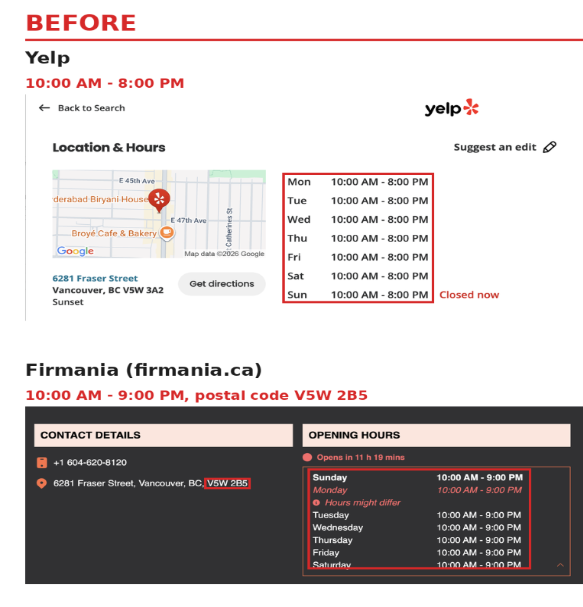
Yelp and Firmania, a Canadian business directory, still showed the old information. Yelp listed 10:00 AM to 8:00 PM. Firmania listed 10:00 AM to 9:00 PM, with a postal code (V5W 2B5) that did not match Google and Yelp (V5W 3A2). A customer who trusted either listing got the wrong idea of when the doors open and close.
Our team found the outdated listings and corrected them to match Google.
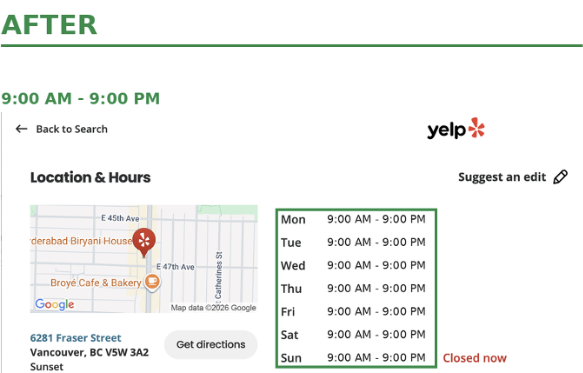
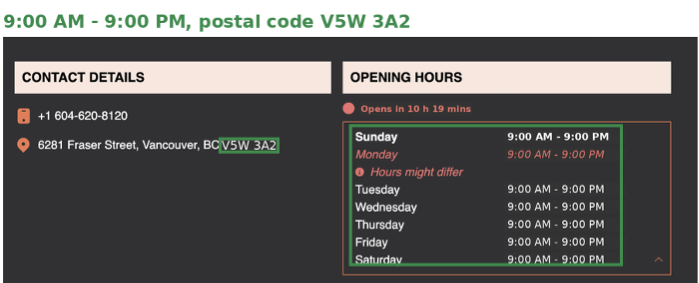
Nothing about the business changed. What changed is that a customer now gets the same answer wherever they look.
Check Your Own Listings in 20 Minutes
You can spot most problems yourself before calling anyone.
- Write down your master record: Exact business name, address (with suite format), phone number, hours and website, as you want them shown everywhere.
- Search for yourself: Look up your business on Google Maps, Apple Maps, Bing, Yelp and other directories for your industry.
- Compare field by field: Check name, address, postal code, phone, hours and website against your master record. Note every mismatch.
- Look for duplicates and old details: Search your old address and old phone number too. A listing from before a move is a common find.
- Fix the big four first: Google, Apple Maps, Bing and Yelp are where most customers look. Then work through the smaller directories.
- Update everywhere at once: Any time your hours change, for a holiday or a new schedule, update every listing, not only Google.
If that list sounds like a lot to keep up with every week, that is the part we take over.
The Bottom Line
Customers decide in seconds, and they trust the answer that appears most often. When your name, address, phone number and hours match across every directory, there is nothing to second-guess. When they do not, you lose visits you never see.
If you would rather not audit this yourself, Rank-IT is built for exactly this. We find where you appear, fix what is wrong, and keep it right.
Frequently Asked Questions
Name, Address and Phone number. It is the core identity of a local business across directories, maps and search engines.
Not technically, but they go out of date in the same way and cause the same confusion. We audit hours, website and categories alongside NAP.
No. Google compares your details against other sources, and customers, navigation apps and assistants use those sources too. A correct Google profile with wrong listings elsewhere still sends people the wrong information.
No one can guarantee rankings. Fixing NAP removes a conflict that can hold your listing back and gives your reviews, posts and website a reliable base to work from.
Yes. We audit your existing listings, correct outdated details, remove or merge duplicates, and add your business where it is missing.
At least every time your hours, address, phone number or name change. Rank-IT includes weekly accuracy checks so changes and duplicates do not sit unnoticed.